Climber.Org logo

Sierra Nevada Bear Boxes
Details for YV02

Updated 21 Jun 2008, see revision history for details.
CORRECTIONS WOULD BE APPRECIATED! contact Steve Eckert.
Search and Navigate  |   Trip Reports  |   Trip Announcements  |   Roster
Driving Directions  |   Reference Data  |   Gear  |   Common Sense Rules!
For bear box data, including maps and location instructions, you can jump to:
  • the main Bear Box Page or a clickable Bear Boxes Map
  • click on a sorted list of 141 bear boxes or short list of 25 box regions

    Bear box 'YV02'
    (Curry Village)

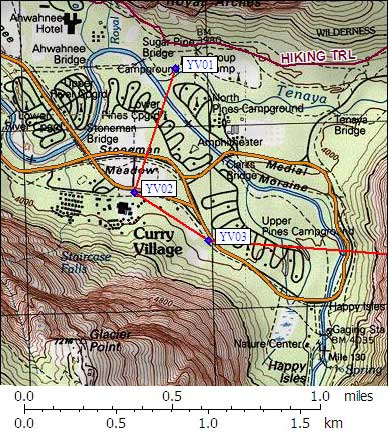
    Detail Map: (scroll down for directions, waypoints, and area map)

    1. YV02 is 120 standard boxes, at about 4000 feet, in the Yosemite Valley and Merced River region.

    2. Directions from Steve Eckert, with GPS waypoint, Sep 2002:
      Public car use boxes at the Curry Village day use parking lot, and east all the way along the road by the tent cabins. From Hwy 140, turn south at the sign for Curry Village, then turn east at the last opportunity just before the buildings. At least 30 groups of 4 standard bear boxes are here, but many of them seem to have padlocks on them. You might have to hunt for an empty one. The presence of padlocks implies your food may be taken by other humans. There are no signs indicating whether it is OK to put on a lock or whether the boxes are reserved for certain users.

    3. Find waypoint YV02 in region waypoints or all waypoints file.
      (NAD83 decimal degrees or NAD27 UTM data suitable for TOPO! software or Waypoint+ software)
        (lat,lon) = (37.7378700, -119.5703700) in decimal degrees, NAD83.
        (zone,east,north) = (11S, 273587.0, 4179643.0) in decimal meters, NAD27.
    4. Previous box is YV01: Curry Area Backpacker Campground.

    5. Next box is YV03: Curry Area Backpacker Parking.

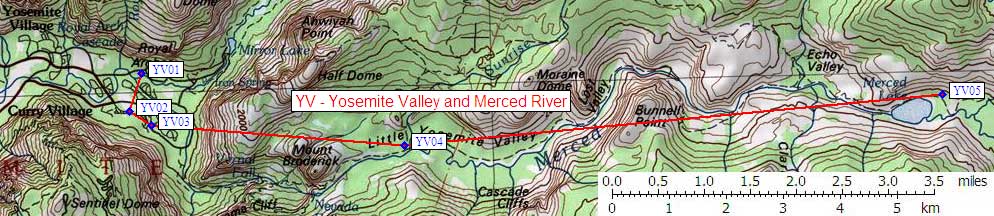
    6. Scroll down for a regional map of the entire Yosemite Valley and Merced River region.

    7. Use Google Maps or Google Earth to view this region overlaid with roads and trails on satellite images or maps.
      (Click on any icon to get details in a popup, double-left-click to zoom in, double-right-click to zoom out.)


    Map exported from TOPO! software, used with permission.