Climber.Org logo

Sierra Nevada Bear Boxes
Details for CG03

Updated 21 Jun 2008, see revision history for details.
CORRECTIONS WOULD BE APPRECIATED! contact Steve Eckert.
Search and Navigate  |   Trip Reports  |   Trip Announcements  |   Roster
Driving Directions  |   Reference Data  |   Gear  |   Common Sense Rules!
For bear box data, including maps and location instructions, you can jump to:
  • the main Bear Box Page or a clickable Bear Boxes Map
  • click on a sorted list of 141 bear boxes or short list of 25 box regions

    Bear box 'CG03'
    (Copper Ck Jct Road's End)

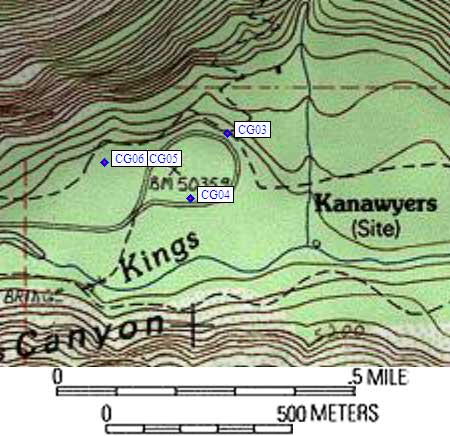
    Detail Map: (scroll down for directions, waypoints, and area map)

    1. CG03 is four large boxes, at about 5000 feet, in the Cedar Grove Area region.

    2. Note: As of 2004, the rangers say the southern parking loop (near the river) is for day use only. Backpackers must park in the northern loop and must have a car pass (issued with your permit). There were no signs to indicate this, and no obvious enforcement, but watch out!

    3. Directions from Steve Eckert, with GPS waypoint, July 2004:
      Four large boxes just uphill from the most northern parking loop, where the Copper Creek trail meets the pavement, at Road's End.

    4. Directions from 'pctPacker', Dec 1999:
      Four large bear boxes in the middle of the northern parking loop at Road's End (not the permit kiosk parking loop, the other one) roughly 5 miles east of Cedar Grove.

    5. Find waypoint CG03 in region waypoints or all waypoints file.
      (NAD83 decimal degrees or NAD27 UTM data suitable for TOPO! software or Waypoint+ software)
        (lat,lon) = (36.7962900, -118.5832100) in decimal degrees, NAD83.
        (zone,east,north) = (11S, 358832.0, 4073246.0) in decimal meters, NAD27.
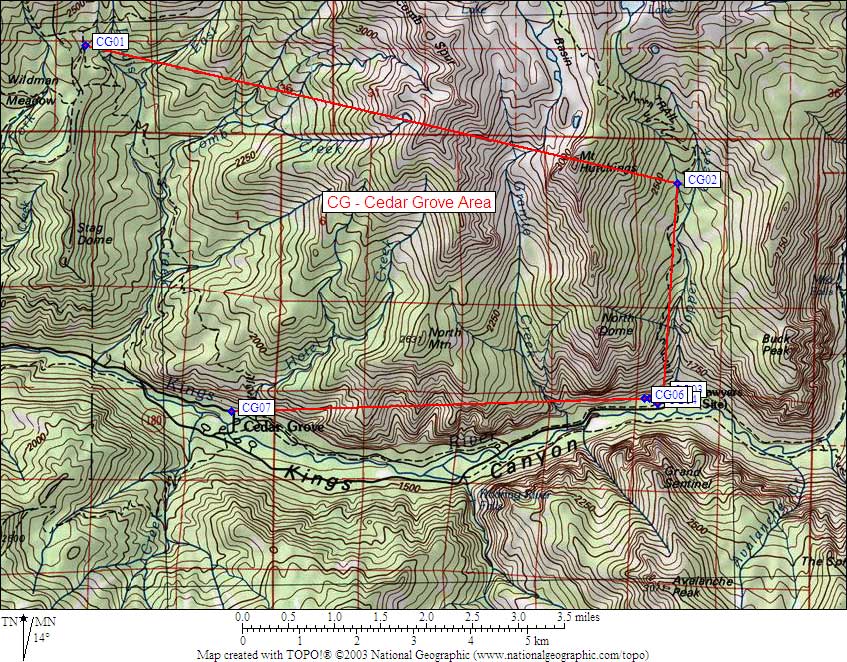
    6. Previous box is CG02: Tent Meadow.

    7. Next box is CG04: Day Use Lot, Road's End.

    8. Scroll down for a regional map of the entire Cedar Grove Area region.

    9. Use Google Maps or Google Earth to view this region overlaid with roads and trails on satellite images or maps.
      (Click on any icon to get details in a popup, double-left-click to zoom in, double-right-click to zoom out.)


    Map exported from TOPO! software, used with permission.